UI/UX Designer

E-COMMERCE APP

Star School Record management app Star

Tomeline

4 Weeks

My Role

Sole UI/UX Designer, User Research, Prototyping & Visual Design

Overview

School record management app is aimed to help in the student grading process. The app was designed with Teachers and parents in mind. In this platform, we offer streamlined Grade Recording, Generate Accurate Report Cards, offer Customization Options, and a user-Friendly Interface.

Problem

  1. Manual Grade Recording: Teachers often record grades manually using pen and paper or spreadsheets, maintaining separate records for each subject and assessment.
  2. Calculation of Grades: Teachers manually calculate cumulative grades by aggregating scores from various assessments, which can be time-consuming and prone to errors.
  3. Report Card Preparation: Teachers typically compile grades and other relevant information manually to generate report cards at the end of each term.
  4. Printing and Distribution: Report cards are usually printed and distributed to students and parents physically.

Solutions

  1. Teachers can easily record student grades electronically, eliminating the need for manual data entry
  2. Teachers can automatically calculate cumulative grades based on predefined criteria, saving on time and reducing errors.
  3. Teachers will have the ability to customize report card templates to match their school’s branding and specific formatting preferences.
  4. Teachers easily generate report cards with just a few clicks, reducing the time and effort required.
  5. Teachers can quickly email generated report card to parents

Design Process

Empathize

Develop a deep understanding of the challenge.

( User Research, User Interviews )

Define

Clearly articulate the problem you want to solve.

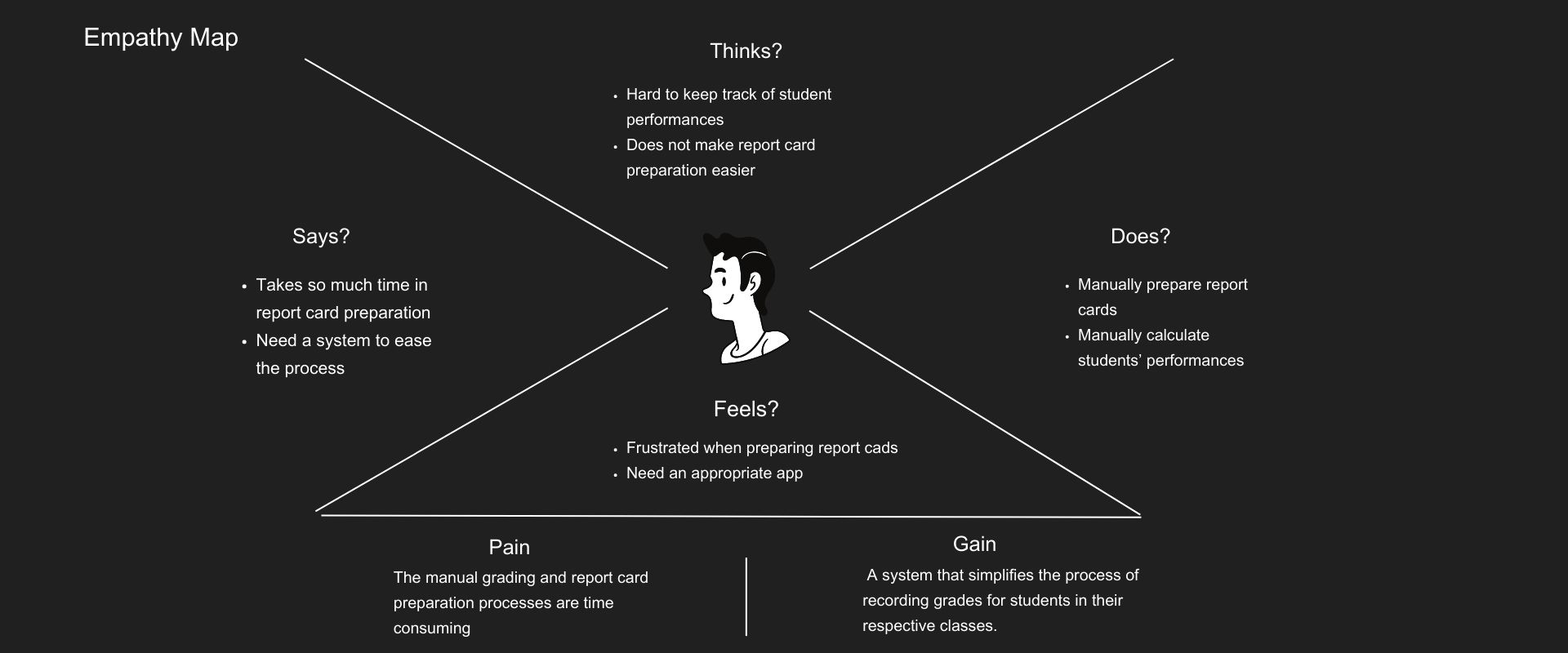
( Empathy Map, Journey Map, User Personas)

Ideate

Brainstorm potential solution.

( User Flows, Wireframing )

Prototype

Design a prototype to test all part of the solution

Test

Usability Testing Iteration

Empathize

Empathy is an important part of the user centered design process, it helps to see things from the others perspective, put biases and assumptions aside and try to truly understand the realities and problems of the situation, what others want, need and feel.

User Research

User research was conducted to identify the problem faced by Teachers who are our primary focus. I conducted initial data analysis to understand the project in detail through Desk research.

The research was conducted to understand how much time goes into formulating report cards that reflect student academic performance.

  • In my research I discovered that Teachers often record grades manually using pen and paper or spreadsheets, maintaining separate records for each subject and assessment.
  • Teachers manually calculate cumulative grades by aggregating scores from various assessments, which can be time-consuming and prone to errors.
  • Teachers typically compile grades and other relevant information manually to generate report cards at the end of each term.
  • Report cards are usually printed and distributed to students and parents physically.

User Research

I carried out qualitative research with 5 participants with a focus on analyzing and visualizing data from various sources and present it on one screen. The aim was to have the interviewees answer open ended questions based on their pain points, and goals.

Competitor Analysis

Competitor

Pros

  1. Track Performances
  2. Student and Teachers growth analysis
  3. Local languages materials

Cons

  1. Teachers have limited options
  2. Lack student chat option
  1. Focuses on student and learning process
  2. Online resource to aid in study
  1. Limited interaction
  2. No quick response to questions students may be having

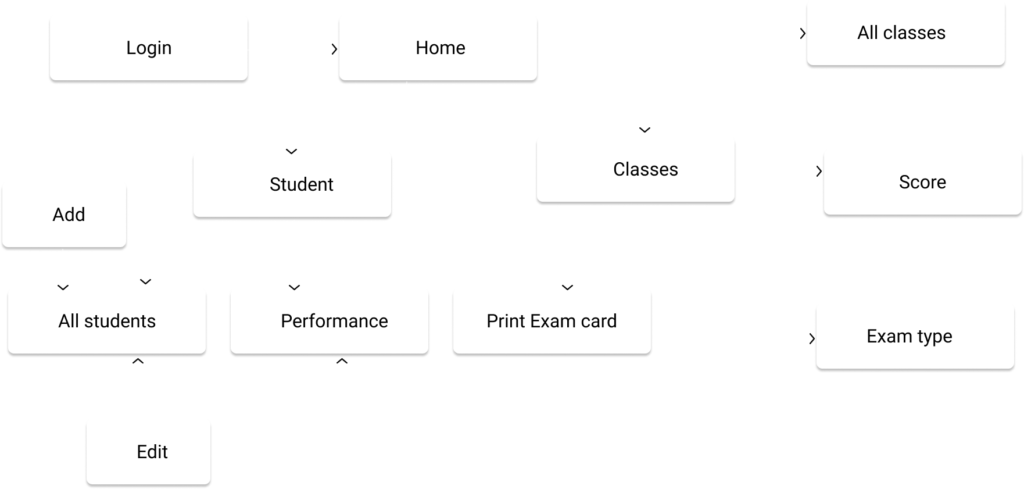
User Flow

I created user flow to understand how the user navigate and behave while using the product

Hi-Fidelity screens

Visual design is the use of imagery, color, space, typography, and layouts to enhance usability and improve the user experience

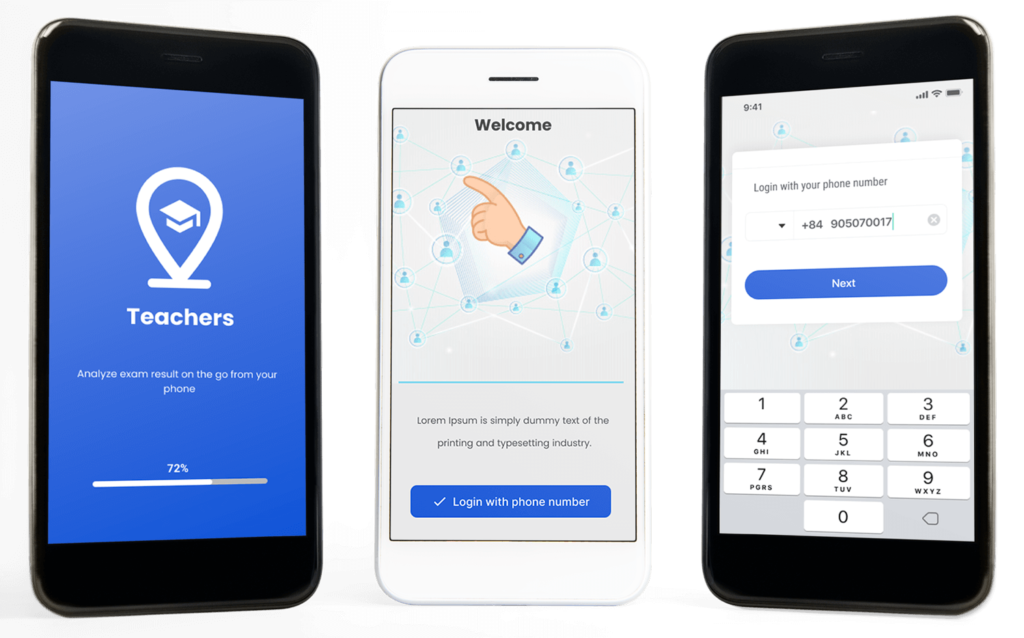
Onboarding/login screen

When user open the app for the first time, finds the onboarding feature then gets directed to login page where s/he inputs phone number to access further information.

Home screen

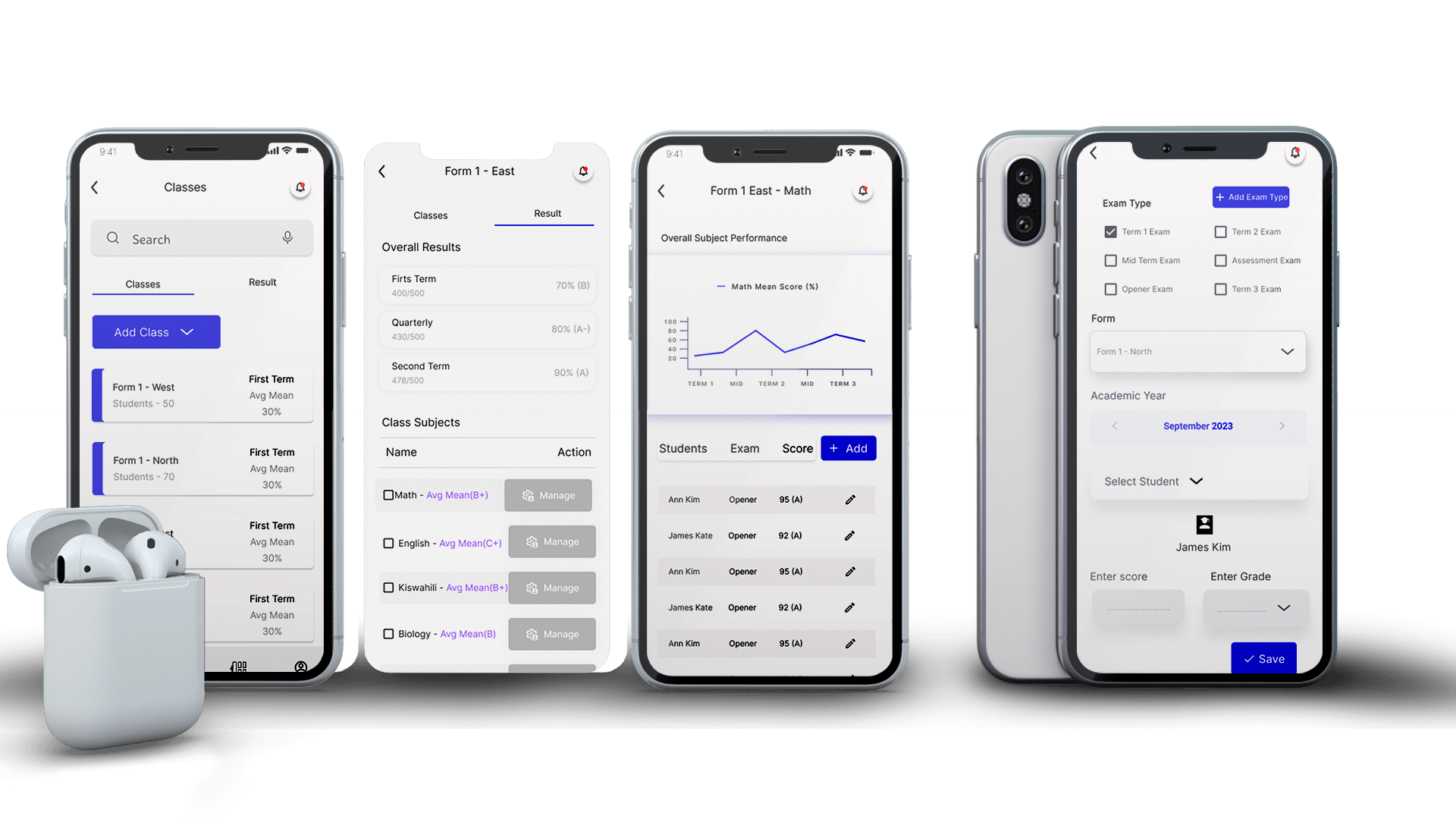
The home screen was designed to provide relevant overall school information on students performances and best performing subjects throughout the academic year, giving teachers ability to calculate performance targets.

Students

By clicking on the student dashboard, we navigate to list of all student and overall score per exam type and their respective classes- student can be added, edited, viewed and print of report card.

Classes

This will show different classes with overall mean grade, subject performance, subjects in each level, ability to add class, exam type, score

Conclusion

I would like to emphasize the immense importance of user feedback in shaping and enhancing our school management app specifically designed for the current Kenyan curriculum. Gathering user feedback is not just a routine activity but a critical step in our journey towards delivering a truly user-centered and impactful solution.

User feedback serves as a compass that guides us towards meeting the needs and expectations of our users, which primarily include teachers, students, and parents. By actively seeking their insights and opinions, we gain valuable perspectives on how our app aligns with the Kenyan curriculum, how intuitive and user-friendly it is, and how effectively it supports their day-to-day activities.T

Scroll to Top